How to get rec league stats without retyping your scoresheets
Published · Updated
Roberto Santana, organizer of the SMBHL, a ball hockey league in Laval.
To get stats for a rec league without retyping anything, keep the paper scoresheet at the game, scan the QR code printed on it and send the photo. Then you review what was read before the stats update.
In plenty of Sunday leagues, the same argument comes back in the locker room: who's really leading the league? Everyone has an answer, and it's usually their own name. Nobody has real numbers, because nobody wants to retype a scoresheet every week. I get it: I don't want to spend my evening tallying up the points either.
Key takeaways
- Stats come from a sheet you already fill in at the game.
- The effort is a photo, not typing.
- A quick review catches mistakes before the stats change.
- For now, the reading picks up the score, goals and assists.
Why don't Sunday leagues have stats?
It's not a lack of interest, it's the retyping. Players love knowing who's leading, but someone has to transcribe every sheet, every week, and that someone is almost always the league organizer.
Week one is fine. By week five, the sheets are piling up in the hockey bag, and by mid-season nobody knows where the numbers stand. The scoresheet isn't the problem: it's already filled in at the game. The step after is.
What do stats change in a league?
Stats give the whole league something to talk about: who has the most goals, the most assists, the most points. They settle the Sunday argument with numbers instead of memories.
At the end of the season, they also decide the awards: most goals, most assists, most points. You don't need fifty columns: goals, assists and points are enough for most rec leagues.
How do you get stats without retyping everything?
Keep the paper sheet at the game and let a photo replace the typing. You keep the final say: nothing changes in the stats until you accept. Here are the four steps, as they work in Notre Ligue.
1. The sheet at the game
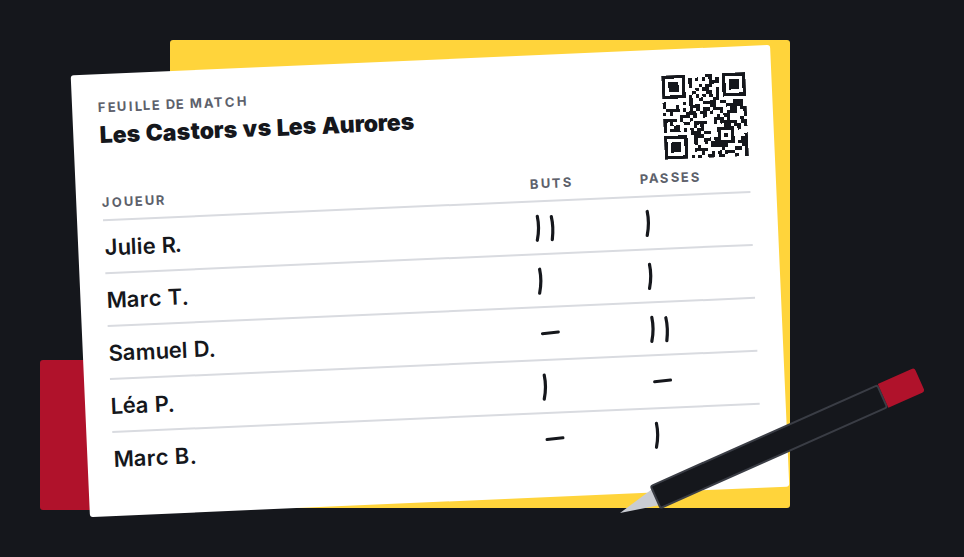
Print the scoresheet before the game, from the game's page or the schedule. Both teams' player names are already on it, with a QR code in the top right corner. During the game, the scorekeeper makes a mark next to the name for each goal (G) and each assist (A). A sub who isn't on the sheet gets written in by hand on a blank line.
2. Scan the QR code and send the photo
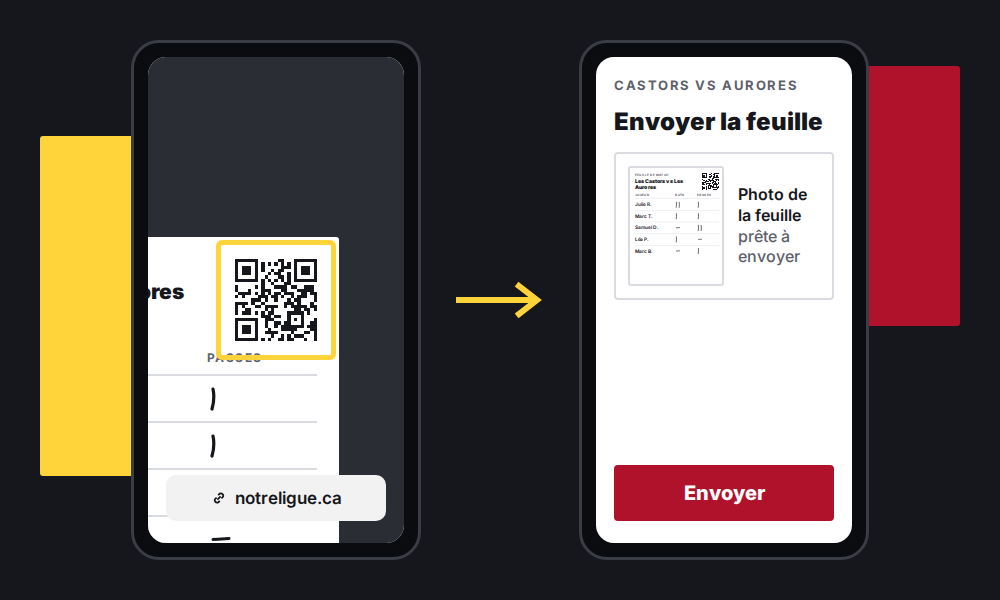
After the game, the scorekeeper, or anyone holding the sheet, points their phone's camera at the QR code and opens the link it shows. A page opens in the browser, with no account and no app: take a photo of the sheet, flat, well lit, with all four corners showing, then tap Send. The link works from one hour before the night's first game until 48 hours after the last one. You can also send the photos yourself from the game's page.
3. You review
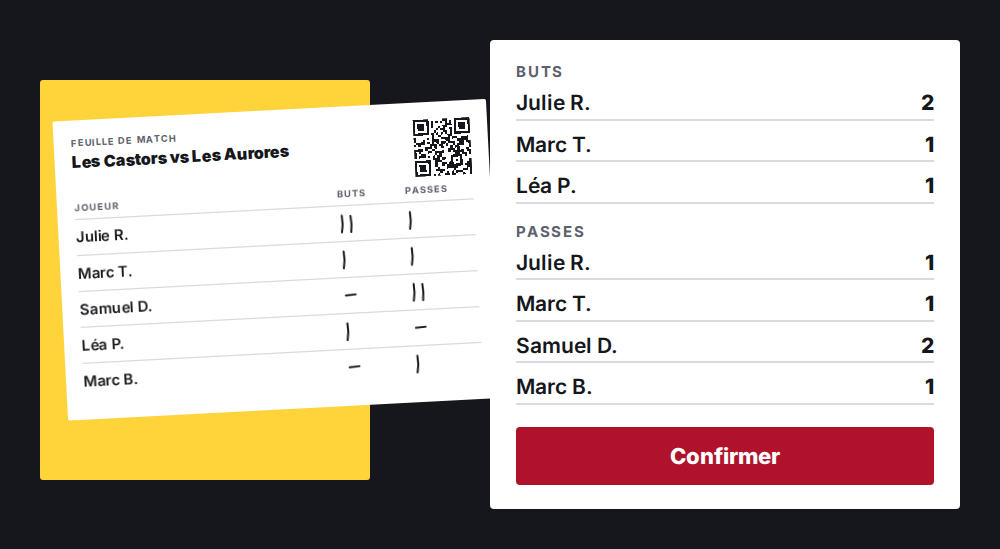
The photo is read as soon as it arrives, and you get an email asking you to check it. The review page shows the photo next to the score, goals and assists read for each player. Anything that needs your eye has a yellow border and the reason: a handwritten name, goals that don't add up to the score, more assists than your league allows. Fix what needs fixing, then tap "Accept and save".
4. The stats are up to date
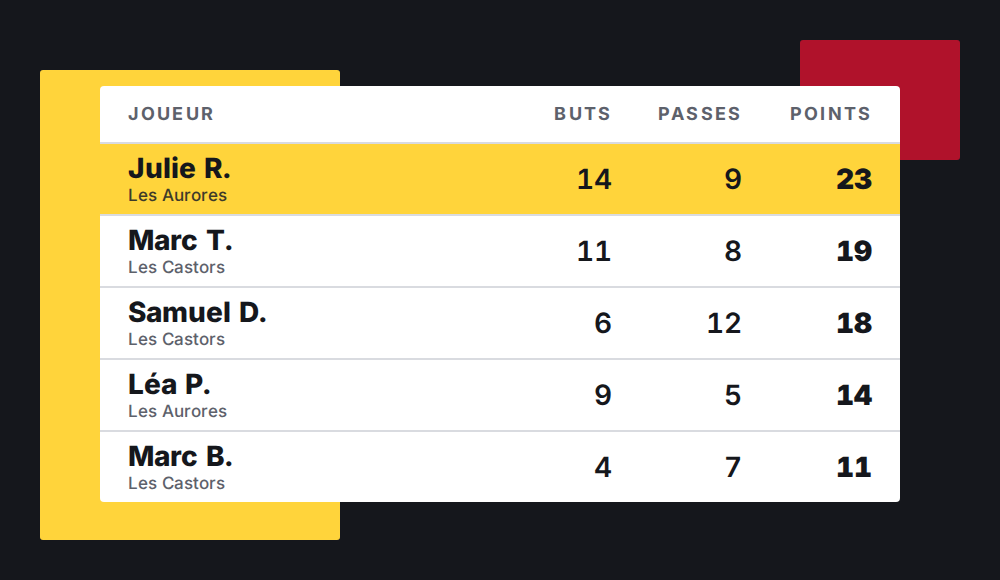
Once you accept, the score, goals and assists are saved for the game, the same way as if you had entered them by hand, and the photos are deleted. If your league has "Player stats" turned on, the leaders table on your public page updates.
What makes a scan reliable?
A clear sheet, then a review. The reading can get things wrong, especially with hard-to-read handwriting, and the review step is where mistakes get caught.
- One scorekeeper per game, picked before the game.
- Readable marks and names, on the right player's line.
- A flat sheet, no folds, all four corners in the photo.
- Good light, no shadow across the sheet.
Which method should you use to track stats?
| Method | Effort during the game | Effort after the game | Stats up to date when? | Weak point |
|---|---|---|---|---|
| Notes on a phone or in a notebook | Low, for one person | Add it all up and copy it out | When someone does the count | It all rests on one person, and notes get lost |
| Spreadsheet typed after the game | A paper sheet | Retype everything, every week | When someone has the time | The backlog builds after a few weeks |
| Paper sheet scanned with a QR code | A paper sheet | A photo, then a review | After your review | You need a readable sheet and someone to review it |
| Live stat app | One person on a phone the whole game | Almost nothing | During the game | Someone has to watch the screen from start to finish |
How do you know your stat tracking isn't working?
- You retype sheets on Monday night.
- Two people keep two versions of the stats.
- Nobody trusts the numbers when they come out.
- The season ends with no leaders table.
What mistakes ruin league stats?
- No single scorekeeper: everyone writes a little, and nobody is responsible.
- Letting illegible sheets through, with marks between two lines or names crossed out.
- Skipping the review: a reading mistake becomes a stats mistake.
- Waiting until the end of the season to enter everything.
Without retyping anything
You can do all of this by hand with a spreadsheet. If you'd rather not, Notre Ligue prints the scoresheet with your players' names and a QR code. The scorekeeper fills it in at the game, scans the code with a phone and sends the photo, with no account. AI reads the photo, you review what was read, and the stats only change when you accept. For now, the reading picks up the score, goals and assists. A few scans are included in the free plan: see the plans. For the rest of the season, also read how to track attendance without an app and how to build your season schedule. Try Notre Ligue
Frequently asked questions
What does the scan read on the sheet?
The game's score, and each player's goals and assists, whether the name is printed or handwritten. It doesn't read penalties.
Do I have to review every reading?
Yes: nothing is saved until you accept. The page shows the photo next to what was read and puts a yellow border on anything that needs your eye, with the reason. In my league, we email a photo of the sheet, and I go over the reading before I publish the stats.
What does the scorekeeper need to do?
Fill in the sheet at the game, legibly, one mark per goal and per assist next to the right name. After the game, scan the QR code and send the photo, with no account and no app, or hand you the sheet so you can send the photo yourself.
What if I find a mistake after accepting?
Fix it by hand on the game's page, like any result: the score and each player's stats can be edited there. The photos are deleted once the reading is accepted, so keep the paper sheet if you want to look at it again.