Why players miss your league messages, and how to fix it
Published · Updated
Roberto Santana, organizer of the SMBHL, a ball hockey league in Laval.

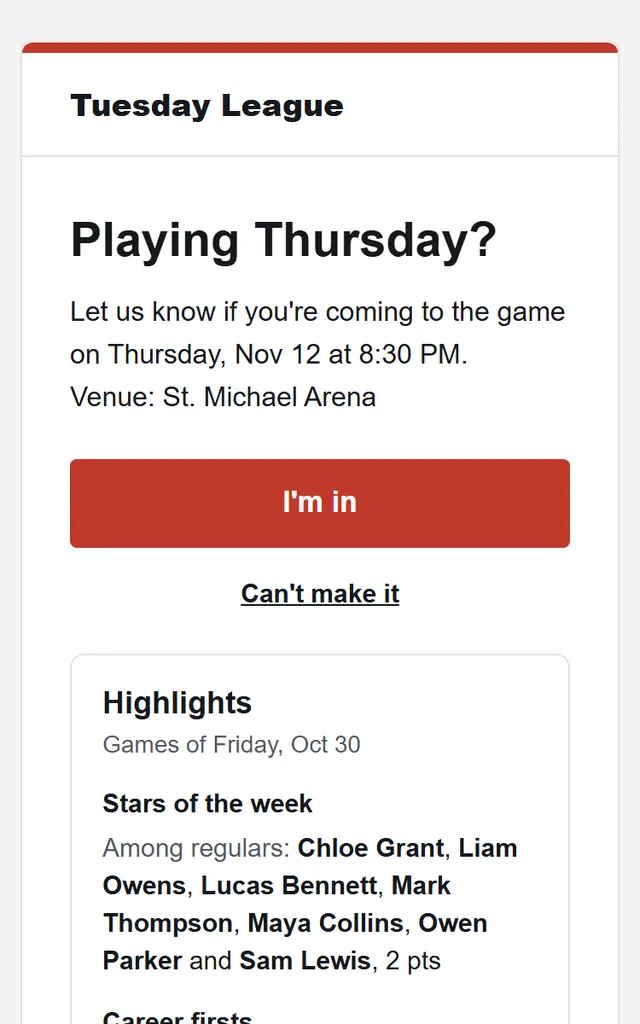
Players miss your messages because they land in the wrong place, at the wrong time, mixed in with everything else. To get answers in time, send one clear request a few days before the game, one reminder to the players who haven't answered, and keep one reliable channel. Notre Ligue does it for you by email: the request goes out 6 days before the game, then one reminder 3 days before, only to those who haven't answered.
To choose the channel for the whole league, read how to run league communication without a Facebook group.
Key takeaways
- A message buried in a group chat is not a message received.
- A request 6 days before, a reminder 3 days before.
- One reliable channel beats three noisy ones.
- Follow up only with the players who haven't answered.
Why do players miss your messages?
There are four common reasons.
- The group chat is muted. A group of 40 people talking about everything, all week: many players mute it after the first evening. Your question lands in the same place as the jokes.
- There are too many apps. Work, the kids' school, the youngest's soccer team: each one has its own app and its own notifications. Yours is one more.
- Notifications are off. Plenty of people turn them off to get some peace. They don't even know you wrote.
- The message is buried. You ask "Who's playing Thursday?" and 40 replies later, the question is gone.
The result: you find out the day before who isn't coming.
When should you send the request and the reminder?
Too early, people don't know their week yet. Too late, there's no time left to find subs. Here is a rhythm that works for one game a week.
| When | What to send | To whom |
|---|---|---|
| 6 days before | The attendance request: "Are you playing?" | Every regular player |
| 3 days before | A short reminder | Those who haven't answered |
| The day before | The details: time, place, team | Those who said yes |
Six days before is the same weekday as the game: your players already know whether their week is free. The reminder, 3 days before, still leaves time to invite a sub.
Email, text, notification or group chat: which one?
Each channel has its strengths. The trouble starts when you use all of them at once.
- Email. Everyone has one, it stays in the inbox and can be found again. It works well for a request with two buttons. The first one can land in spam.
- Text messages. They get read fast. But texting 60 players one by one takes a while, and the replies come back in 60 conversations.
- An app notification. It's fast, if the player installed the app and didn't turn notifications off.
- The group chat. Handy for banter, bad for counting: answers get lost in the thread.
If you post in the group chat, then text, then email, your players no longer know where to answer, and you have to add it all up. Pick one channel for the request and the reminder, tell everyone at the start of the season, and stick to it.
How do you know who actually answered?
A message sent is not an answer. What you need is a list in three parts: yes, no, no answer yet. The third part matters most. It tells you who to write to, and who to leave alone.
In a group chat, that list doesn't exist: you have to reread the thread and count. With a poll, it half exists: the people who didn't vote are invisible. With a spreadsheet kept up to date, or a tool that collects the answers, you see right away who is missing. For the full method, read how to track attendance without an app.
Why follow up only with the silent ones?
Because the others have already done their part. A reminder sent to everyone teaches your fastest players that your messages aren't meant for them. Next time, they read them less.
A targeted reminder is shorter and clearer: "We're still waiting for your answer for Thursday." Often one reminder is enough. After that, a personal text to the last few silent players does the rest.
Before the season
- Pick one channel for requests and reminders.
- Tell every player, once.
- Check each player's email address or number.
- Ask everyone to look for your first message in their spam folder.
- Set the rhythm: the request, the reminder, the details.
- Get your sub list ready for the gaps.
Doing it by hand
A spreadsheet with one column per game and one row per player, and an alarm on your phone 6 days before each game. You send the request by email, with everyone in BCC, and you write each answer in its cell. Three days before, you write only to the players whose cell is empty.
It works, on one condition: never skip a week.
With Notre Ligue
Notre Ligue emails the attendance request 6 days before each game to every regular player. They answer yes or no from the link, with no account and no password. Three days before, a reminder goes only to those who haven't answered, and the day before, the players who are in get the details. No automatic email goes out between 11 PM and 7 AM.
The "All your games" link at the bottom of every email opens the player's "My games" page: their upcoming games of the season, with an answer for each one, in one place. Players who want them add "My games" to their phone's home screen, with no app store, and get notifications: a sub call, a cancelled game, the details the day before. For those who choose it, even the attendance request comes as a notification.
The game page shows the organizer who is playing, who is out and who hasn't answered, with a button to send a reminder now to those who haven't answered. On the paid plans, the advanced schedule lets you choose when each email goes out and add up to 3 reminders. See the plans

Frequently asked questions
How many days before the game should you send the attendance request?
For one game a week, 6 days before works well: it's the same weekday as the game. Add a reminder 3 days before for those who haven't answered.
Should the reminder go to everyone?
No. Follow up only with the players who haven't answered. The others have already done their part.
Is email better than the group chat?
For an attendance request, yes: each player gets their own request and answers it separately.
Do my players have to install an app?
Not with Notre Ligue: they answer from the link in the email, with no account and no password. Those who want notifications add "My games" to their phone's home screen, with no app store.